Deluge Forge brings IDE-style scripting tools to Zoho development
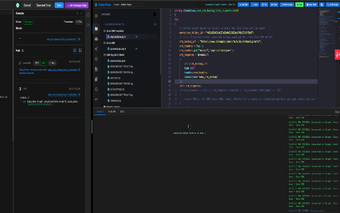
Deluge Forge is a Chrome extension from a specialized toolset developer, built for Zoho developers and administrators to improve Deluge scripting workflows. The extension acts as a companion to the Zoho IDE and gives a more capable in-browser development surface so developers can edit and manage Deluge code without switching to external tools. It bundles workspace controls and cloud-backed preferences, and targets developers, system architects, and IT administrators who automate processes across Zoho CRM, Creator, and Books. That reduces friction when deploying automations across multiple Zoho modules.
How the extension reshapes a Deluge developer's workflow
The extension positions itself as an IDE companion that organizes scripts into project workspaces and tightens the edit-deploy loop. Workspace management creates named collections for related scripts, which helps when maintaining multiple automations across different business units. Practical outcomes include fewer manual file exports, clearer project boundaries, and an editor surface that keeps functions grouped by purpose rather than scattered across separate records.
How it behaves inside Chromium browsers under everyday load
Designed for Chrome and other Chromium-based browsers, the tool runs inside the browser process as a lightweight client rather than a separate desktop application. That design choice reduces context switching and keeps the development surface available alongside Zoho pages. Performance follows the host browser: responsiveness depends on open tabs and extensions, but the client model keeps the workflow contained to a single browser session.
How synchronization supports cross-device development
Online synchronization stores workspaces and developer preferences in the cloud so code and settings carry between sessions and machines. This helps developers who switch between desktop and remote environments to keep a consistent setup. The sync model is built into the extension as a core capability, making it practical for teams that want shared workspace structure without manually copying scripts between environments.
Who benefits from multi-application integration and who does not
The tool integrates its editor enhancements with Zoho CRM, Zoho Books, and Zoho Creator, which benefits teams that maintain automations across those platforms. It suits developers and IT administrators focused on the Zoho ecosystem, especially when a unified workspace reduces task fragmentation. Developers who require a standalone, full-featured desktop IDE may find the browser-bound surface limiting compared with external development environments.
A targeted browser-based IDE companion for Zoho Deluge development
The extension is a practical choice for Deluge authors who prioritize organized, cross-application scripting within the browser and value cloud-backed workspace continuity. The trade-off is being tied to a browser-hosted environment and a niche feature set aimed at Zoho’s scripting workflows. For teams entrenched in Zoho platforms, the extension sharpens the in-browser development process; developers needing a full desktop IDE should weigh that constraint.